
| Question. 46 Note: This question is part of a series of questions that present the same scenario. Each question in the series contains a unique solution that might meet the stated goals. Some question sets might have more than one correct solution, while others might not have a correct solution. After you answer a question in this section, you will NOT be able to return to it. As a result, these questions will not appear in the review screen. You have a hybrid configuration of Azure Active Directory (Azure AD). You have an Azure HDInsight cluster on a virtual network. You plan to allow users to authenticate to the cluster by using their on-premises Active Directory credentials. You need to configure the environment to support the planned authentication. Solution: You create a site-to-site VPN between the virtual network and the on-premises network. Does this meet the goal? A. Yes B. No |
46. Click here to View Answer
Answer:
B
Explanation:
AI: Creating a site-to-site VPN between the virtual network and the on-premises network will establish a secure connection between the two networks, but it alone does not enable users to authenticate to the Azure HDInsight cluster using their on-premises Active Directory credentials.
To support the planned authentication, you need to use Azure AD Domain Services to synchronize on-premises Active Directory with Azure AD. This synchronization will allow users to authenticate to the Azure HDInsight cluster using their on-premises Active Directory credentials.
Therefore, the given solution alone does not meet the goal.
| Question. 47 Your network contains an Active Directory forest named contoso.com. The forest contains a single domain. You have an Azure subscription named Sub1 that is associated to an Azure Active Directory (Azure AD) tenant named contoso.com. You plan to deploy Azure AD Connect and to integrate Active Directory and the Azure AD tenant. You need to recommend an integration solution that meets the following requirements: ✑ Ensures that password policies and user logon restrictions apply to user accounts that are synced to the tenant ✑ Minimizes the number of servers required for the solution. Which authentication method should you include in the recommendation? A.federated identity with Active Directory Federation Services (AD FS) B.password hash synchronization with seamless single sign-on (SSO) C.pass-through authentication with seamless single sign-on (SSO) |
47. Click here to View Answer
Answer:
C
Explanation:
1. C. pass-through authentication with seamless single sign-on (SSO)
2. Companies with a security requirement to immediately enforce on-premises user account states, password policies, and sign-in hours might use this authentication method (PTA).https://learn.microsoft.com/en-us/azure/active-directory/hybrid/choose-ad-authn
| Question. 48 Your network contains an on-premises Active Directory domain named corp.contoso.com. You have an Azure subscription named Sub1 that is associated to an Azure Active Directory (Azure AD) tenant named contoso.com. You sync all on-premises identities to Azure AD. You need to prevent users who have a givenName attribute that starts with TEST from being synced to Azure AD. The solution must minimize administrative effort. What should you use? A. Synchronization Rules Editor B. Web Service Configuration Tool C. the Azure AD Connect wizard D. Active Directory Users and Computers |
48. Click here to View Answer
Answer:
A
Explanation:
Use the Synchronization Rules Editor and write attribute-based filtering rule.
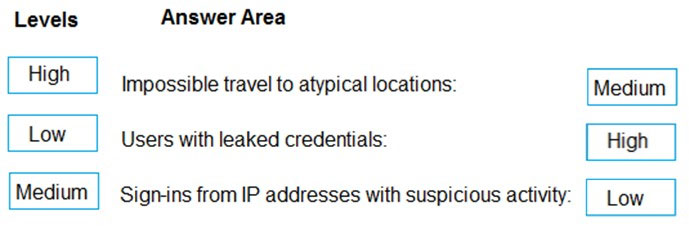
| Question. 49 DRAG DROP – You are implementing conditional access policies. You must evaluate the existing Azure Active Directory (Azure AD) risk events and risk levels to configure and implement the policies. You need to identify the risk level of the following risk events: ✑ Users with leaked credentials ✑ Impossible travel to atypical locations ✑ Sign-ins from IP addresses with suspicious activity Which level should you identify for each risk event? To answer, drag the appropriate levels to the correct risk events. Each level may be used once, more than once, or not at all. You may need to drag the split bar between panes or scroll to view content. NOTE: Each correct selection is worth one point. Select and Place: 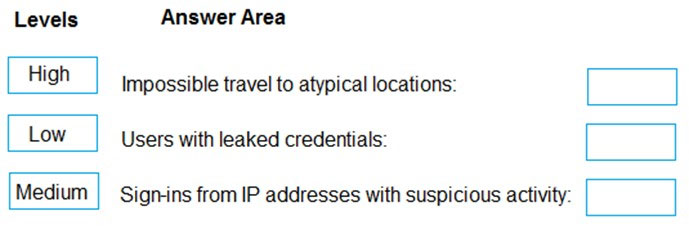 |
49. Click here to View Answer
Answer:
Explanation:
Azure AD Identity protection can detect six types of suspicious sign-in activities:
✑ Users with leaked credentials
✑ Sign-ins from anonymous IP addresses
✑ Impossible travel to atypical locations
Sign-ins from infected devices –
✑ Sign-ins from IP addresses with suspicious activity
✑ Sign-ins from unfamiliar locations
These six types of events are categorized in to 3 levels of risks ” High, Medium & Low: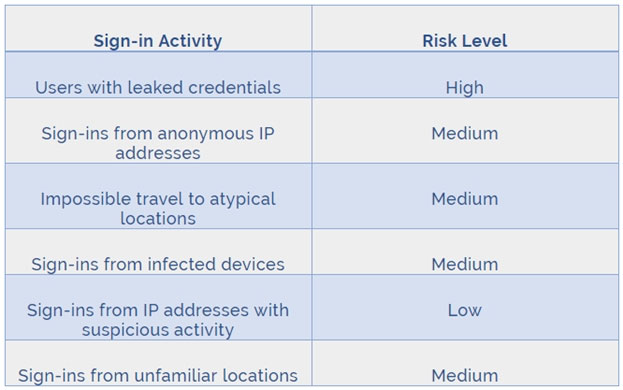
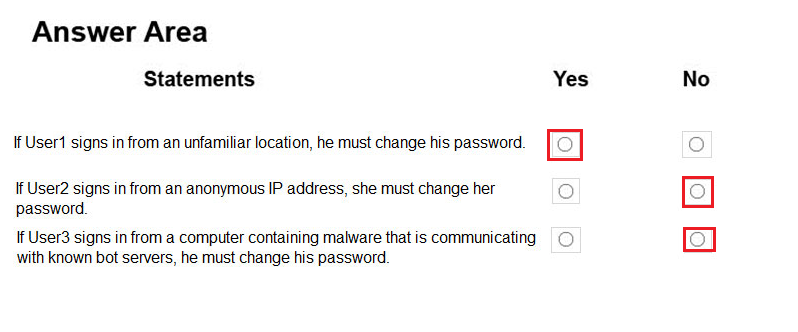
| Question. 50 HOTSPOT – You have an Azure Active Directory (Azure AD) tenant named contoso.com that contains the users shown in the following table.  You create and enforce an Azure AD Identity Protection user risk policy that has the following settings: ✑ Assignment: Include Group1, Exclude Group2 ✑ Conditions: Sign-in risk of Medium and above ✑ Access: Allow access, Require password change For each of the following statements, select Yes if the statement is true. Otherwise, select No. NOTE: Each correct selection is worth one point. Hot Area: |
50. Click here to View Answer
Answer:
Explanation:
Box 1: Yes –
User1 is member of Group1. Sign in from unfamiliar location is risk level Medium.
Box 2: No
Box 3: No –
Sign-ins from IP addresses with suspicious activity is low.
Note:
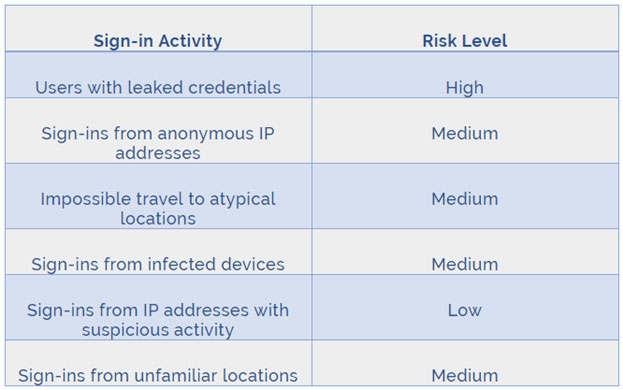
Azure AD Identity protection can detect six types of suspicious sign-in activities:
✑ Users with leaked credentials
✑ Sign-ins from anonymous IP addresses
✑ Impossible travel to atypical locations
✑ Sign-ins from infected devices
✑ Sign-ins from IP addresses with suspicious activity
✑ Sign-ins from unfamiliar locations
These six types of events are categorized in to 3 levels of risks ” High, Medium & Low:
References:
http://www.rebeladmin.com/2018/09/step-step-guide-configure-risk-based-azure-conditional-access-policies/