
| Question. 51 DRAG DROP – You need to configure an access review. The review will be assigned to a new collection of reviews and reviewed by resource owners. Which three actions should you perform in sequence? To answer, move the appropriate actions from the list of actions to the answer area and arrange them in the correct order. Select and Place: 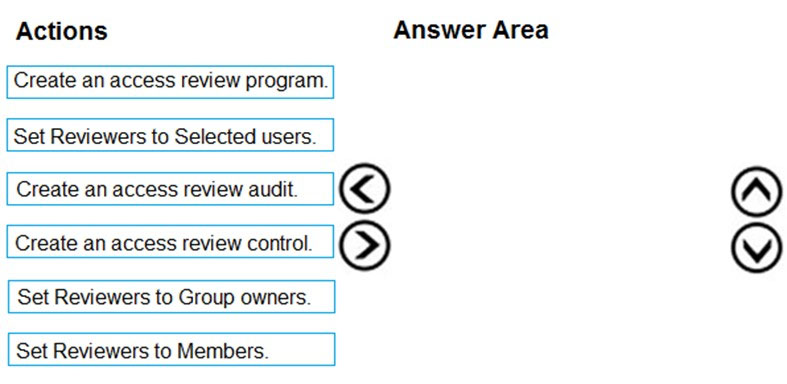 |
51. Click here to View Answer
Answer:
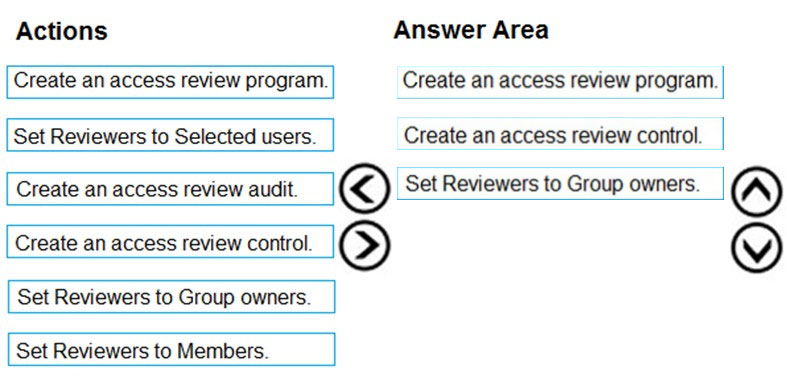
Explanation:
Step 1: Create an access review program
Step 2: Create an access review control
Step 3: Set Reviewers to Group owners
In the Reviewers section, select either one or more people to review all the users in scope. Or you can select to have the members review their own access. If the resource is a group, you can ask the group owners to review.
| Question. 52 HOTSPOT – You have an Azure Active Directory (Azure AD) tenant named contoso.com. The tenant contains the users shown in the following table. 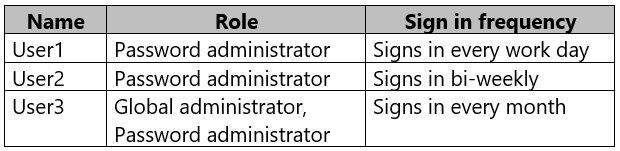 You configure an access review named Review1 as shown in the following exhibit. 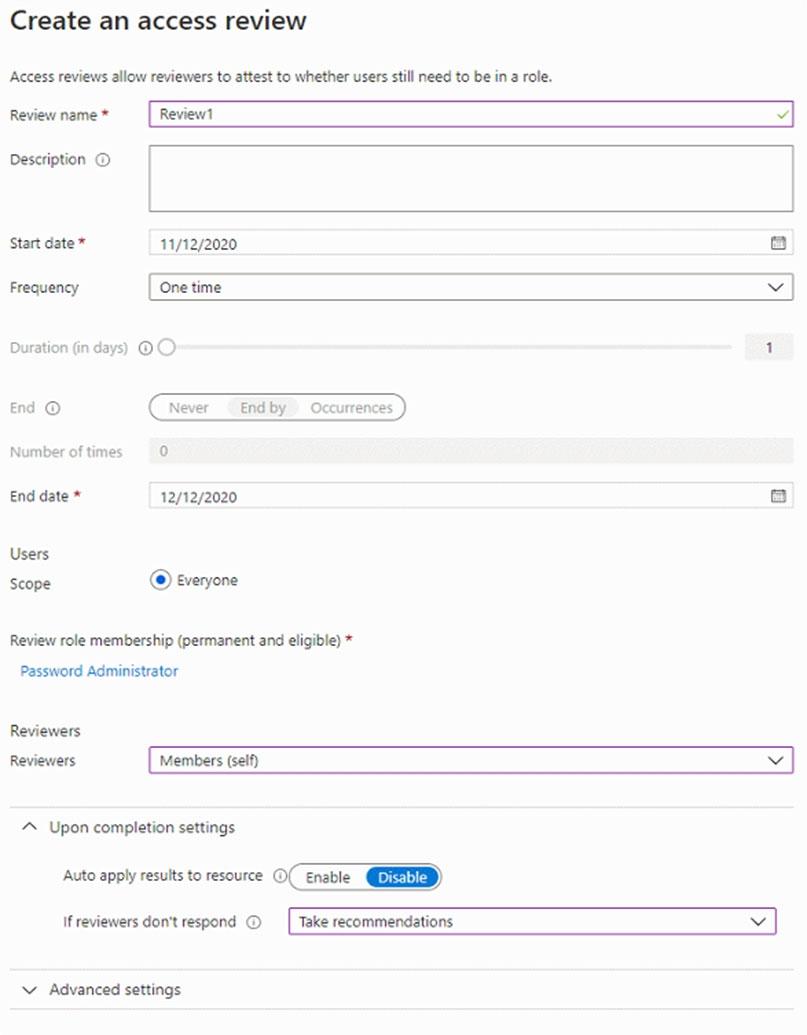 Use the drop-down menus to select the answer choice that completes each statement based on the information presented in the graphic. NOTE: Each correct selection is worth one point. Hot Area: 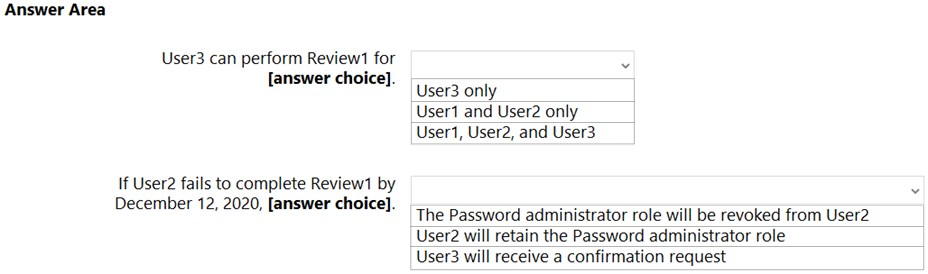 |
52. Click here to View Answer
Answer:
Explanation:
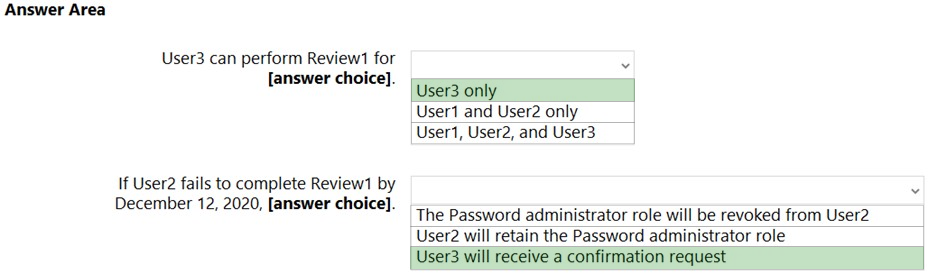
Box 1: User3 only –
Use the Members (self) option to have the users review their own role assignments.
Box 2: User3 will receive a confirmation request
Use the Should reviewer not respond list to specify what happens for users that are not reviewed by the reviewer within the review period. This setting does not impact users who have been reviewed by the reviewers manually. If the final reviewer’s decision is Deny, then the user’s access will be removed.
No change – Leave user’s access unchanged
Remove access – Remove user’s access
Approve access – Approve user’s access
Take recommendations – Take the system’s recommendation on denying or approving the user’s continued access
| Question. 53 You have an Azure subscription named Sub1 that is associated to an Azure Active Directory (Azure AD) tenant named contoso.com. An administrator named Admin1 has access to the following identities: ✑ An OpenID-enabled user account ✑ A Hotmail account ✑ An account in contoso.com ✑ An account in an Azure AD tenant named fabrikam.com You plan to use Azure Account Center to transfer the ownership of Sub1 to Admin1. To which accounts can you transfer the ownership of Sub1? A. contoso.com only B. contoso.com, fabrikam.com, and Hotmail only C. contoso.com and fabrikam.com only D. contoso.com, fabrikam.com, Hotmail, and OpenID-enabled user account |
53. Click here to View Answer
Answer:
C
Explanation:
When you transfer billing ownership of your subscription to an account in another Azure AD tenant, you can move the subscription to the new account’s tenant. If you do so, all users, groups, or service principals who had role based access (RBAC) to manage subscriptions and its resources lose their access. Only the user in the new account who accepts your transfer request will have access to manage the resources.
Reference:
https://docs.microsoft.com/en-us/azure/billing/billing-subscription-transfer https://docs.microsoft.com/en-us/azure/billing/billing-subscription-transfer#transferring-subscription-to-an-account-in-another-azure-ad-tenant
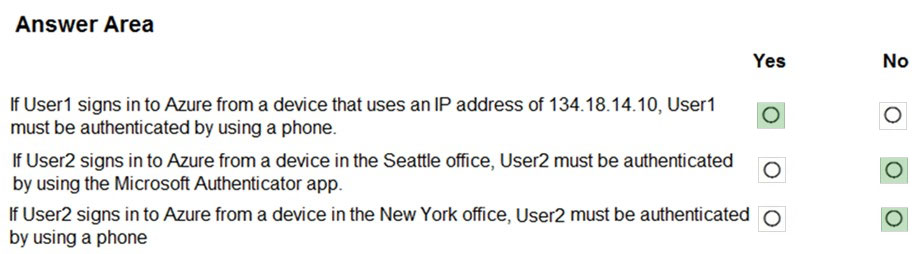
| Question. 54 HOTSPOT – Your company has two offices in Seattle and New York. Each office connects to the Internet by using a NAT device. The offices use the IP addresses shown in the following table.  The company has an Azure Active Directory (Azure AD) tenant named contoso.com. The tenant contains the users shown in the following table.  The MFA service settings are configured as shown in the exhibit. (Click the Exhibit tab.) 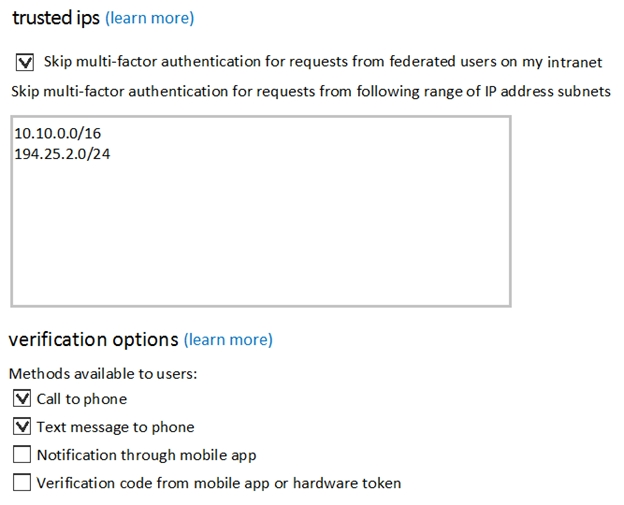 For each of the following statements, select Yes if the statement is true. Otherwise, select No. NOTE: Each correct selection is worth one point. Hot Area: 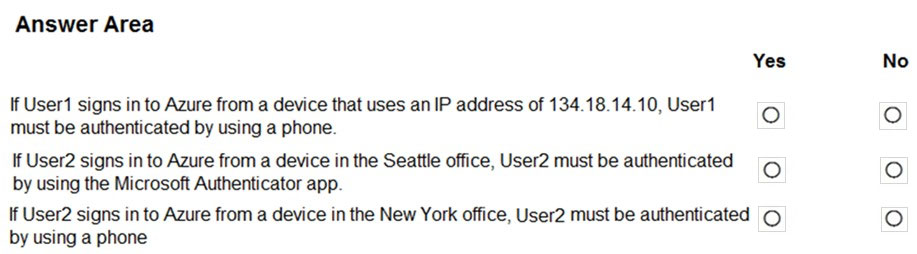 |
54. Click here to View Answer
Answer:
Explanation:
Box 1: Yes –
Box 2: No –
Use of Microsoft Authenticator is not required. Either a text or phone call is required for MFA.
Note: Microsoft Authenticator is a multifactor app for mobile devices that generates time-based codes used during the Two-Step Verification process.
Box 3: No –
The New York IP address subnet is included in the “skip multi-factor authentication for request.
Reference:
https://www.cayosoft.com/difference-enabling-enforcing-mfa/
| Question. 55 Your company plans to create separate subscriptions for each department. Each subscription will be associated to the same Azure Active Directory (Azure AD) tenant. You need to configure each subscription to have the same role assignments. What should you use? A. Azure Security Center B. Azure Policy C. Azure AD Privileged Identity Management (PIM) D. Azure Blueprints |
55. Click here to View Answer
Answer:
D
Explanation:
Just as a blueprint allows an engineer or an architect to sketch a project’s design parameters, Azure Blueprints enables cloud architects and central information technology groups to define a repeatable set of Azure resources that implements and adheres to an organization’s standards, patterns, and requirements.
Blueprints are a declarative way to orchestrate the deployment of various resource templates and other artifacts such as:
✑ Role Assignments
✑ Policy Assignments
✑ Azure Resource Manager templates
✑ Resource Groups
Reference:
https://docs.microsoft.com/en-us/azure/governance/blueprints/overview