
| Question. 56 HOTSPOT – You have an Azure Container Registry named Registry1. You add role assignments for Registry1 as shown in the following table. 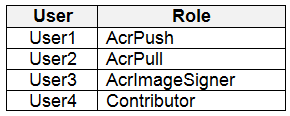 Which users can upload images to Registry1 and download images from Registry1? To answer, select the appropriate options in the answer area. NOTE: Each correct selection is worth one point. Hot Area: 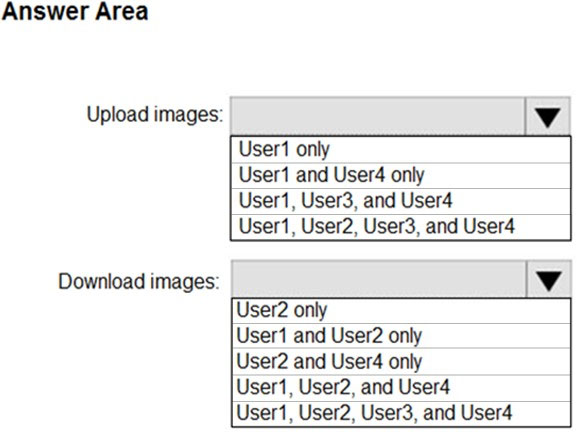 |
56. Click here to View Answer
Answer:
Explanation:
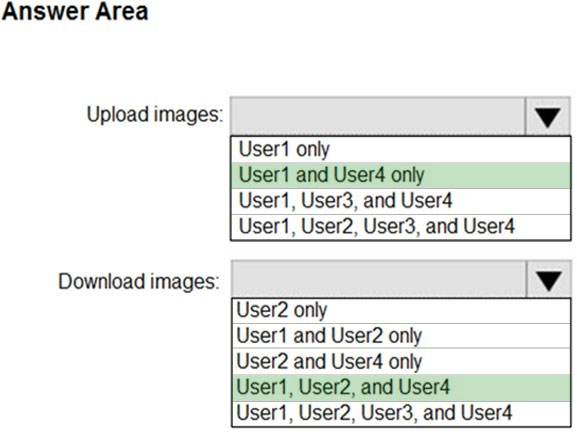
Box 1: User1 and User4 only –
Owner, Contributor and AcrPush can push images.
Box 2: User1, User2, and User4 –
All, except AcrImagineSigner, can download/pull images.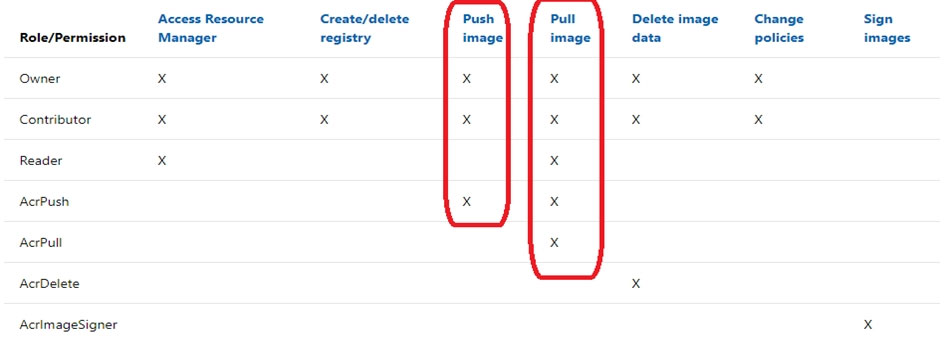
Reference:
https://docs.microsoft.com/bs-latn-ba/azure/container-registry/container-registry-roles
| Question. 57 You have an Azure subscription. You create an Azure web app named Contoso1812 that uses an S1 App Service plan. You plan to – create a CNAME DNS record for www.contoso.com that points to Contoso1812. You need to ensure that users can access Contoso1812 by using the https://www.contoso.com URL. Which two actions should you perform? Each correct answer presents part of the solution. NOTE: Each correct selection is worth one point. A. Turn on the system-assigned managed identity for Contoso1812. B. Add a hostname to Contoso1812. C. Scale out the App Service plan of Contoso1812. D. Add a deployment slot to Contoso1812. E. Scale up the App Service plan of Contoso1812. F. Upload a PFX file to Contoso1812. |
57. Click here to View Answer
Answer:
BF
Explanation:
B: You can configure Azure DNS to host a custom domain for your web apps. For example, you can create an Azure web app and have your users access it using either www.contoso.com or contoso.com as a fully qualified domain name (FQDN).
To do this, you have to create three records:
A root “A” record pointing to contoso.com
A root “TXT” record for verification
A “CNAME” record for the www name that points to the A record
F: To use HTTPS, you need to upload a PFX file to the Azure Web App. The PFX file will contain the SSL certificate required for HTTPS.
Reference:
https://docs.microsoft.com/en-us/azure/dns/dns-web-sites-custom-domain
| Question. 58 Note: This question is part of a series of questions that present the same scenario. Each question in the series contains a unique solution that might meet the stated goals. Some question sets might have more than one correct solution, while others might not have a correct solution. After you answer a question in this section, you will NOT be able to return to it. As a result, these questions will not appear in the review screen. You have an Azure subscription named Sub1. You have an Azure Storage account named sa1 in a resource group named RG1. Users and applications access the blob service and the file service in sa1 by using several shared access signatures (SASs) and stored access policies. You discover that unauthorized users accessed both the file service and the blob service. You need to revoke all access to sa1. Solution: You create a lock on sa1. Does this meet the goal? A. Yes B. No |
58. Click here to View Answer
Answer:
B
Explanation:
To revoke a stored access policy, you can either delete it, or rename it by changing the signed identifier. Changing the signed identifier breaks the associations between any existing signatures and the stored access policy. Deleting or renaming the stored access policy immediately affects all of the shared access signatures associated with it.
Reference:
https://docs.microsoft.com/en-us/rest/api/storageservices/Establishing-a-Stored-Access-Policy
| Question. 59 Note: This question is part of a series of questions that present the same scenario. Each question in the series contains a unique solution that might meet the stated goals. Some question sets might have more than one correct solution, while others might not have a correct solution. After you answer a question in this section, you will NOT be able to return to it. As a result, these questions will not appear in the review screen. You have a hybrid configuration of Azure Active Directory (Azure AD). You have an Azure HDInsight cluster on a virtual network. You plan to allow users to authenticate to the cluster by using their on-premises Active Directory credentials. You need to configure the environment to support the planned authentication. Solution: You deploy Azure Active Directory Domain Services (Azure AD DS) to the Azure subscription. Does this meet the goal? A. Yes B. No |
59. Click here to View Answer
Answer:
A
Explanation:
Azure Active Directory Domain Services
Azure AD DS provides a managed domain that’s fully compatible with Windows Server Active Directory. Microsoft takes care of managing, patching, and monitoring the domain in a highly available (HA) setup. You can deploy your cluster without worrying about maintaining domain controllers.
Users, groups, and passwords are synchronized from Azure AD. The one-way sync from your Azure AD instance to Azure AD DS enables users to sign in to the cluster by using the same corporate credentials.
| Question. 60 Your network contains an Active Directory forest named contoso.com. You have an Azure Active Directory (Azure AD) tenant named contoso.com. You plan to configure synchronization by using the Express Settings installation option in Azure AD Connect. You need to identify which roles and groups are required to perform the planned configuration. The solution must use the principle of least privilege. Which two roles and groups should you identify? Each correct answer presents part of the solution. NOTE: Each correct selection is worth one point. A. the Domain Admins group in Active Directory B. the Security administrator role in Azure AD C. the Global administrator role in Azure AD D. the User administrator role in Azure AD E. the Enterprise Admins group in Active Directory |
60. Click here to View Answer
Answer:
CE
Explanation:
C. the Global administrator role in Azure AD
E. the Enterprise Admins group in active directory
Reference: