
| Question. 66 You have an Azure subscription that contains the resources shown in the following table. 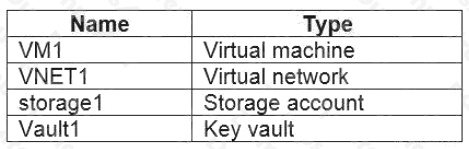 You plan to enable Azure Defender for the subscription. Which resources can be protected by using Azure Defender? A. VM1, VNET1, storage1, and Vault1 B. VM1, VNET1, and storage1 only C. VM1, storage1, and Vault1 only D. VM1 and VNET1 only E. VM1 and storage1 only |
66. Click here to View Answer
Answer:
A
Explanation:
Reference:
https://docs.microsoft.com/en-us/azure/security-center/azure-defender
| Question. 67 You are troubleshooting a security issue for an Azure Storage account. You enable the diagnostic logs for the storage account. What should you use to retrieve the diagnostics logs? A. Azure Security Center B. Azure Monitor C. the Security admin center D. Azure Storage Explorer |
67. Click here to View Answer
Answer:
B
Explanation:
Reference: https://docs.microsoft.com/en-us/azure/storage/blobs/monitor-blob-storage?tabs=azure-portal
| Question. 68 HOTSPOT On Monday, you configure an email notification in Azure Security Center to email notifications to user1@contoso.com about alerts that have a severity level of Low, Medium, or High. On Tuesday, Security Center generates the security alerts shown in the following table. 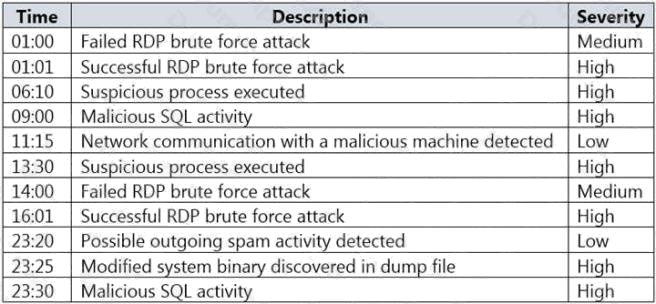 How many email notifications will user1@contoso.com receive on Tuesday? To answer, select the appropriate options in the answer area. NOTE: Each correct selection is worth one point. Hot Area: 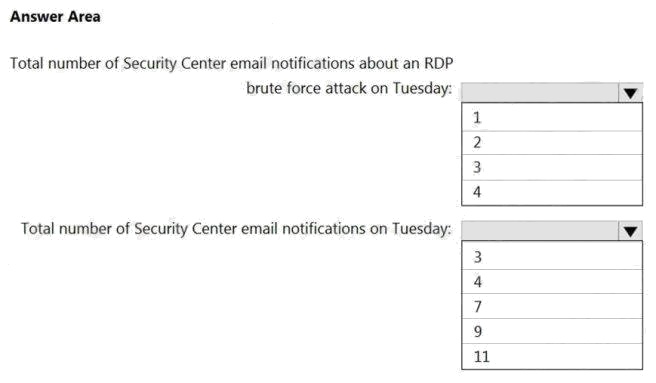 |
68. Click here to View Answer
Answer:
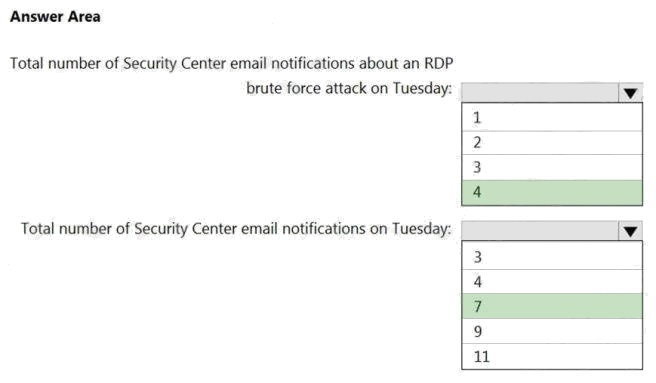
Explanation:
Reference:
https://docs.microsoft.com/en-us/azure/security-center/security-center-provide-security-contact-details
| Question. 69 SIMULATION You need to ensure that the events in the NetworkSecurityGroupRuleCounter log of the VNET01-Subnet0-NSG network security group (NSG) are stored in the logs1234578 Azure Storage account for 30 days. To complete this task, sign in to the Azure portal. |
69. Click here to View Answer
Answer:
See the explanation below.
Explanation:
You need to configure the diagnostic logging for the NetworkSecurityGroupRuleCounter log.
1. In the Azure portal, type Network Security Groups in the search box, select Network Security Groups from the search
results then select VNET01-Subnet0-NSG. Alternatively, browse to Network Security Groups in the left navigation pane.
2. In the properties of the Network Security Group, click on Diagnostic Settings.
3. Click on the Add diagnostic setting link.
4. Provide a name in the Diagnostic settings name field. It doesnt matter what name you provide for the exam.
5. In the Log section, select NetworkSecurityGroupRuleCounter.
6. In the Destination details section, select Archive to a storage account.
7. In the Storage account field, select the logs1234578 storage account.
8. In the Retention (days) field, enter 30.
9. Click the Save button to save the changes.
| Questions. 70 SIMULATION You need to ensure that web1234578 is protected from malware by using Microsoft Antimalware for Virtual Machines and is scanned every Friday at 01:00. To complete this task, sign in to the Azure portal. |
70. Click here to View Answer
Answer:
See the explanation below.
Explanation:
You need to install and configure the Microsoft Antimalware extension on the virtual machine named web1234578.
1. In the Azure portal, type Virtual Machines in the search box, select Virtual Machines from the search results then select
web1234578. Alternatively, browse to Virtual Machines in the left navigation pane.
2. In the properties of web11597200, click on Extensions.
3. Click the Add button to add an Extension.
4. Scroll down the list of extensions and select Microsoft Antimalware.
5. Click the Create button. This will open the settings pane for the Microsoft Antimalware Extension.
6. In the Scan day field, select Friday.
7. In the Scan time field, enter 60. The scan time is measured in minutes after midnight so 60 would be 01:00, 120 would be
02:00 etc.
8. Click the OK button to save the configuration and install the extension.